


The best tech gifts for remote workers are the ones that make their everyday work easier. A comfortable headset can improve meeting-heavy days, a multi-port USB-C charger can simplify a cluttered desk, and a portable laptop screen extender can give serious multitaskers more room to work.
But choosing a useful gift isn't always straightforward, especially when you don't know which accessories someone already owns or whether a new device will work with their laptop.
Whether you're shopping for a partner, family member, friend, or remote colleague, this 2026 holiday guide will help you find practical gift ideas based on how they work, what frustrates them, and how much you want to spend.
How to Choose a Tech Gift They'll Actually Use
Before looking at products, think about an ordinary workday for the person receiving your gift.
Do they spend hours in video meetings? Are they constantly switching between documents and browser tabs? Is their desk crowded with chargers, or do they pack up their laptop several times a week?
These small details often reveal which accessories would be most useful.
For example, someone who spends most of the day on calls may appreciate better audio more than another monitor. A financial analyst comparing spreadsheets might find extra display space more valuable. Meanwhile, a hybrid worker could benefit from a compact charger or foldable laptop stand that's easy to carry.
The following recommendations focus on everyday usefulness, recipient suitability, budget, and purchasing considerations rather than simply choosing the newest gadgets.
Quick Gift Guide: 10 Ideas at a Glance
| Tech Gift | Best For | Budget Level | Check Before Buying |
|---|---|---|---|
| Portable laptop screen extender | Heavy multitaskers | Premium | Laptop compatibility, drivers, power |
| Comfortable meeting headset | Frequent video callers | Budget–Midrange | Fit, microphone, connectivity |
| Multi-port USB-C charger | Multi-device users | Budget–Midrange | Wattage and charging ports |
| External webcam | Remote managers and educators | Midrange | Camera quality and mounting |
| Adjustable desk light | Home-office workers | Budget–Midrange | Desk space and lighting needs |
| USB-C hub | Hybrid workers | Budget–Midrange | Required ports and laptop support |
| Foldable laptop stand | Flexible and mobile workers | Budget | Laptop size and stability |
| Cable organization kit | Cluttered desk owners | Budget | Workspace layout |
| Compact wireless keyboard | Writers and hybrid workers | Budget–Midrange | Layout and typing preference |
| Ergonomic mouse | Daily laptop users | Budget–Midrange | Hand fit and grip preference |
Budget categories are general shopping guidance, not fixed product prices. Actual costs depend on the brand, model, and retailer.
If you're buying a surprise gift and know very little about the recipient's equipment, simple desk accessories are often easier to choose. Chargers, hubs, and external displays deserve a closer compatibility check.
10 Practical Tech Gifts for Different Remote Work Needs
1. More Screen Space for Serious Multitaskers: A Portable Laptop Screen Extender
Imagine working on a monthly report while checking figures in another spreadsheet, keeping reference materials open, and responding to messages throughout the day.
On a single laptop screen, those tasks can involve a lot of switching between windows.
For someone who regularly works this way, a portable laptop screen extender can be a thoughtful premium gift. Additional display space allows them to keep related information visible rather than repeatedly minimizing applications.
It can be particularly useful for financial analysts comparing reports, software developers referencing documentation, consultants preparing presentations, and project managers coordinating several tasks.
INVZI offers portable laptop screen extenders for different multi-screen workflows. Some MagHub models add two displays, creating a three-screen workspace including the laptop. Others add three displays for a four-screen setup.
The additional space can be valuable, but it isn't something every remote worker needs.
Before purchasing, confirm the recipient's laptop model, supported display connections, available desk space, and any driver or power requirements. Some setups require software installation, which may be restricted on company-managed laptops.
If you're wondering how additional displays might fit into someone's routine, INVZI's guide to a dual-screen remote work setup provides useful context.
For holiday shopping, the INVZI Black Friday 2026 event page lets you explore MagHub options and check for upcoming campaign announcements. Confirm the eligible models, promotional prices, and event dates on that page once the offers are officially available.
Gift tip: Choose an additional-display accessory for someone who genuinely needs more screen space, not simply because it has impressive specifications.
2. Make Long Video Meetings More Comfortable: A Quality Headset
For some remote workers, video calls take up most of the day.
A comfortable headset with a clear microphone can make those conversations easier to follow, particularly when someone works in a shared home or another environment with background noise.
Look for lightweight construction, comfortable ear cushions, and a microphone suited to the recipient's surroundings.
It's also worth understanding the difference between two common features. Active noise cancellation helps reduce the noise the wearer hears, while microphone noise reduction helps limit unwanted background sound transmitted during calls.
Someone who attends several meetings every day may value a reliable microphone and comfortable fit more than premium audio features designed mainly for music.
Before buying, check whether the person prefers over-ear headphones, earbuds, or an open-ear design.
A headset they can comfortably wear throughout their schedule is often more useful than one chosen entirely for its technical specifications.
3. Simplify Charging Across Multiple Devices: A Multi-Port USB-C Charger
A remote worker may have a laptop, phone, tablet, wireless earbuds, and other devices that need regular charging.
Keeping separate adapters for everything can quickly turn a tidy desk into a collection of cables and occupied outlets.
A multi-port USB-C charger offers a more organized solution. Instead of relying on several individual power adapters, the recipient can charge compatible devices through one appropriately rated charging unit.
GaN technology also allows many modern chargers to deliver substantial power in relatively compact designs, making them practical for both desks and travel bags.
INVZI's multi-port GaN chargers include options for different charging needs.
However, don't assume that a charger with several ports can deliver its maximum advertised wattage through every port simultaneously. Output may be shared when multiple devices are connected.
For a laptop user, check the laptop's required charging power, the charger's per-port and combined output, and the cable specifications.
The official USB Power Delivery guidance from USB-IF explains how the standard supports flexible power delivery between compatible devices.
Gift tip: A charger is especially useful for someone who frequently moves between home and office and would appreciate fewer adapters to carry.
4. Help Them Look Clearer on Video Calls: An External Webcam
Someone who regularly leads online meetings, interviews candidates, or presents to clients may appreciate more control over their camera setup.
An external webcam can offer flexible positioning and, depending on the model, better image quality than an older built-in laptop camera.
This can be useful when a laptop sits off to the side or below eye level, making its built-in camera awkward to use.
A separate webcam can be positioned more naturally, especially when paired with an external monitor.
Before choosing one, consider the quality of the recipient's existing camera. Many modern laptops already provide satisfactory video for everyday meetings.
Also check mounting options, operating-system compatibility, and whether additional software is needed.
For someone who spends most of their working hours in video conferences, a well-chosen webcam may be a more practical upgrade than another general-purpose desk accessory.
5. Improve a Small or Dim Workspace: An Adjustable Desk Light
Not everyone has a dedicated home office with large windows and ideal lighting.
Some people work from a bedroom corner, a compact apartment desk, or a shared living space where lighting changes throughout the day.
An adjustable desk light can make reading documents, writing notes, and completing evening tasks more convenient.
Models with adjustable brightness and positioning offer greater flexibility for different desk layouts.
For someone who regularly appears on video calls, a suitably positioned light may also help create more even facial lighting. A dedicated video light could be a better choice if calls are the main priority.
Choose a design that fits the recipient's available space without taking over the desktop.
Gift tip: This is a relatively approachable choice when you don't know someone's laptop specifications but have a good idea of their working environment.
6. Keep Laptop Connections Simple: A USB-C Hub
A laptop may have only a few ports, even when its owner uses an external drive, keyboard, monitor, and several other accessories.
That can become frustrating for someone who regularly connects and disconnects equipment.
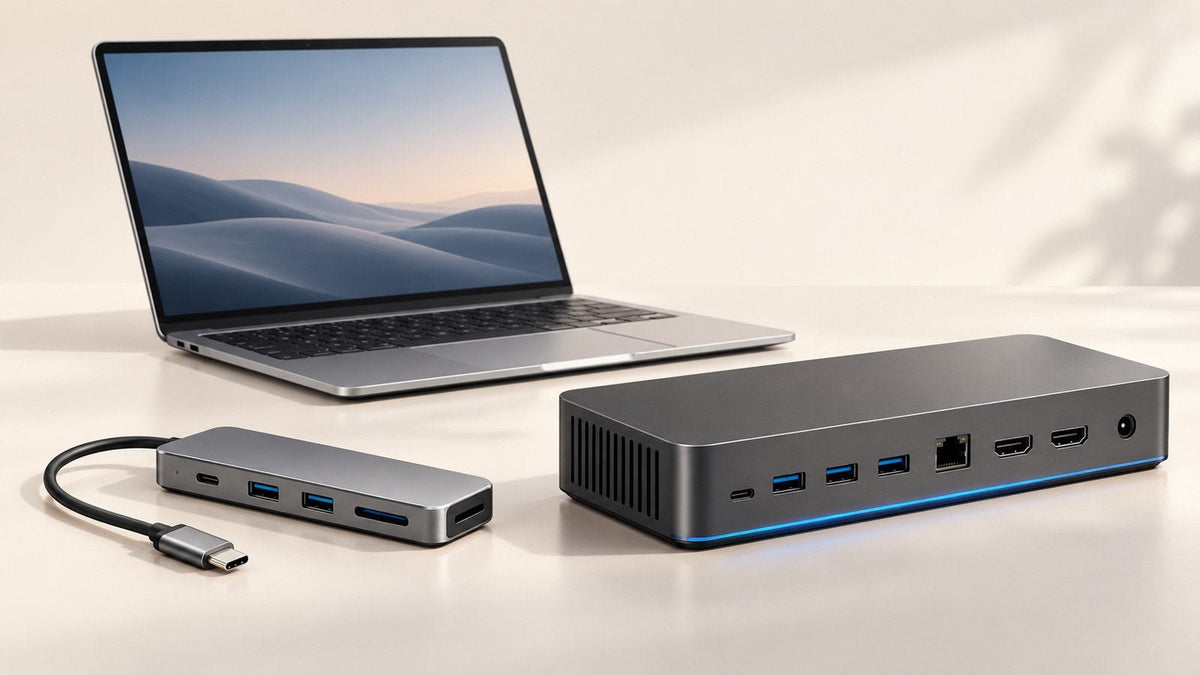
A compact USB-C hub can bring several compatible connections into one accessory, helping reduce the number of individual adapters someone needs to carry.
It's a particularly useful gift for hybrid workers who move between desks and want a simpler connection routine.
For people with more permanent setups, a docking station may be more appropriate. The choice depends on the devices they connect and how often their workspace changes.
If you're unsure, this explanation of the difference between a USB-C hub and a docking station can help clarify the options.
Remember that a USB-C connector doesn't automatically support every function. Video output, charging passthrough, and data capabilities depend on the laptop and accessory.
Before buying, find out which connections the recipient actually uses.
7. Give Flexible Workers a Better Screen Position: A Foldable Laptop Stand
Hybrid workers rarely have exactly the same desk setup everywhere.
One day they might work from home. The next, they may use an office desk or a coworking space.
A foldable laptop stand gives them more flexibility to adjust their laptop's screen height and angle without carrying a bulky desktop accessory.
Lightweight models can be especially convenient for workers who already carry their laptop and other essentials between locations.
Screen positioning matters, too. OSHA's monitor positioning guidance recommends considering viewing distance, screen height, and placement as part of a comfortable computer workstation.
Keep in mind that raising a laptop also raises its built-in keyboard. For longer working sessions, using a separate keyboard and mouse may provide a better arrangement.
Look for a stable design that supports the recipient's laptop size and doesn't obstruct its ventilation.
For someone without a permanent workspace, a foldable stand can be a small but useful addition to their daily routine.
8. Reduce Desk Clutter: A Cable Organization Kit
Some of the most useful holiday gifts are surprisingly simple.
A cable organization kit may include reusable ties, adhesive clips, cable sleeves, or a small pouch for charging accessories.
These items help keep commonly used cables accessible while reducing the mess that builds up around a laptop, monitor, and charger.
For a worker with a permanent desk, cable clips can keep charging cords from slipping behind furniture.
For someone who frequently changes work locations, an accessory pouch can make it easier to find charging cables and adapters inside a backpack.
Cable organizers are also relatively easy to buy without knowing a recipient's computer model.
If you're planning a small holiday gift for a coworker, this is one of the more practical options.
You can also pair a cable organization kit with another useful accessory, creating a coordinated desk gift without spending heavily.
9. Make Typing More Flexible: A Compact Wireless Keyboard
A compact wireless keyboard can be a useful addition for someone who regularly types emails, prepares reports, writes code, or works with long documents.
It allows the recipient to position their laptop screen independently of the keyboard, which can be helpful when using a laptop stand or external display.
For hybrid workers, a compact design may also be easier to pack than a full-size desktop keyboard.
However, keyboard preferences are personal.
Some people enjoy the tactile feel of mechanical switches, while others prefer a quieter, low-profile design.
Check whether the recipient uses a Mac or Windows layout, whether they need a number pad, and how much space is available on their desk.
A keyboard that matches their typing habits is more likely to be appreciated than one chosen simply because it has extra features.
10. Make Everyday Navigation Easier: A Comfortable External Mouse
A laptop trackpad works well for many tasks, but some people prefer the control and feel of a separate mouse.
For someone who regularly works in spreadsheets, edits documents, or navigates between applications, an external mouse can be a useful daily accessory.
A compact wireless model may suit a hybrid worker, while someone with a permanent desk might prefer a larger shape designed for their grip.
Comfort is highly individual, however.
Hand size, grip style, button placement, and desk space all influence whether a mouse feels right.
Avoid assuming that an unusual ergonomic design will automatically be more comfortable for everyone.
If possible, choose a model that can be returned or exchanged if the fit isn't suitable.
Tech Gifts for Remote Workers by Budget
A thoughtful technology gift doesn't have to be expensive. What matters is whether it solves a problem the recipient actually experiences.
Here's a practical way to think about your holiday shopping budget.
| Budget | Gift Strategy | Suitable Gift Categories |
|---|---|---|
| Under $50 | Solve a small, recurring frustration | Cable organizers, simple laptop stands, compact desk accessories |
| $50–$150 | Improve frequently used equipment | USB-C chargers, headsets, webcams, keyboards |
| $150–$300 | Make a more substantial workspace upgrade | Premium meeting accessories or a combination of complementary tools |
| Around $300+ | Consider a premium gift for a well-understood need | Compatible portable laptop screen extenders and advanced workspace accessories |
These are general budget examples. Prices and available configurations vary, so check current listings before making a purchase.
When a Small Gift Makes More Sense
If you're shopping for a colleague or someone whose setup you don't know well, a modest gift may be the better choice.
Cable organizers, simple stands, and other everyday desk accessories generally require fewer technical decisions than charging or display equipment.
They're also useful for people who already have a laptop and a reasonably complete workspace.
When a Premium Gift Is Worth Considering
More expensive gifts make sense when you understand the recipient's needs and know they'll use the additional functionality.
For example, a multi-screen accessory could be valuable for a person who regularly compares financial reports or manages several software tools.
But someone whose work mainly involves email, writing, and video meetings might appreciate a high-quality headset or a few smaller workspace upgrades more.
Choose the gift that fits their work, not simply the highest-priced item within your budget.
What to Check Before Buying a Tech Gift for Someone Else
A gift can look perfect online and still be frustrating if it doesn't fit the recipient's equipment or routine.
A few simple checks can prevent that.
Find Out What They Already Own
Before ordering, try to learn which accessories the recipient uses regularly.
Perhaps they already have a headset they love, but constantly complain about limited laptop ports. Or maybe their desk is organized, yet they struggle to work on a single screen.
Those details help you avoid buying a duplicate or an accessory that solves a problem they don't have.
You don't need to ask directly about a holiday gift. Casual conversations about their workspace can reveal plenty.
Confirm Compatibility for Connected Devices
If you're buying a charger, USB-C hub, or external display, compatibility matters.
At a minimum, try to confirm:
-
The recipient's laptop model and operating system.
-
Whether the required USB-C, HDMI, or other connections are supported.
-
Any charging wattage, video-output, software installation, or power requirements.
This is especially important for portable multi-screen accessories. Some configurations depend on supported video outputs, while others require a display driver.
When in doubt, verify the exact accessory and laptop combination before ordering.
Think About Their Workspace and Travel Habits
Someone with a spacious, permanent home office may have different needs from someone working at a small table or moving between locations.
A larger accessory isn't necessarily an improvement when desk space is limited.
Similarly, a portable product is only useful if the recipient is comfortable carrying and setting it up.
Consider size, weight, available outlets, and how often the person would need to pack the accessory away.
Check Returns Before Making a Surprise Purchase
Even a carefully selected technology gift may need to be exchanged.
A headset might not fit comfortably, a mouse may not suit someone's grip, or a display accessory might be incompatible with their laptop.
Review the seller's current return policy, delivery estimates, and any holiday-specific conditions before ordering.
This gives both you and the recipient more flexibility if the gift isn't quite right.
Choose a Gift That Fits Their Workday
The most useful holiday gifts for remote workers don't need to be complicated.
A headset can make long meeting days more comfortable. A multi-port charger can simplify charging several devices. A laptop stand or cable organizer can make a small workspace easier to manage.
And for someone whose job involves constant multitasking, additional display space may be a meaningful premium upgrade.
Instead of looking for the most impressive gadget, pay attention to the problems the recipient faces every day.
A gift that removes one recurring frustration can be far more valuable than a device filled with features they'll rarely use.
Frequently Asked Questions
What are the best tech gifts for remote workers in 2026?
The best options depend on the recipient's working habits. Headsets suit people who spend hours in meetings, multi-port USB-C chargers help people manage several devices, and laptop screen extenders can benefit heavy multitaskers. Laptop stands, keyboards, and cable organizers are also practical choices for everyday remote work.
What are good tech gifts for remote workers under $50?
Cable organizers, simple foldable laptop stands, desk lights, and accessory pouches are useful budget-friendly options. They can address everyday problems without requiring complicated setup. Prices vary, but these categories offer plenty of choices for smaller holiday budgets.
Which tech gifts are safest to buy without knowing someone's laptop model?
Accessories with minimal electronic compatibility requirements are generally easier to choose. Consider cable organization kits, desk accessories, or a laptop stand if you know the approximate device size. Chargers, USB-C hubs, and external displays require more careful compatibility checks before purchasing.
Are portable laptop screen extenders good holiday gifts?
Yes, for someone who regularly works with several applications or documents and needs more visible workspace. They can be particularly useful for analysts, developers, and other multitasking-heavy professionals. However, the buyer should confirm the recipient's laptop compatibility, external-display support, driver requirements, and workspace needs before ordering.
What tech gifts are useful for hybrid workers?
Hybrid workers often appreciate accessories that are easy to transport and set up in different locations. Compact USB-C chargers, foldable laptop stands, lightweight keyboards, and portable hubs can make changing workspaces more convenient. The best choice depends on which equipment the recipient already carries between home and office.
How do I choose a tech gift for someone who already has a home office?
Look for a gap in their current setup rather than purchasing another general-purpose gadget. Someone with several devices may benefit from simpler charging, while a frequent video caller might appreciate better audio. If their workspace is already well equipped, a small organization accessory or a replacement for worn equipment may be more useful.

Leave a comment
This site is protected by hCaptcha and the hCaptcha Privacy Policy and Terms of Service apply.